FBS 充值和提現:有關方法、限額和時間的常見問題解答

以下答案涵蓋支援的支付管道、按帳戶類型劃分的最低存款金額、分步存款和提款工作流程、處理視窗、支付限額和常見驗證觸發器。您可以在個人區域找到有關卡片退款、電子錢包規則、銀行轉帳處理以及如何檢查付款狀態的說明。請遵循建議的步驟和文件提示來減少保留並加快審批速度,並記住支付提供者的規則最終決定時間和費用。
Deposit
Can I start trading without any investment?
Please, kindly be informed that the deposit is required for real accounts.But you can see how it works by trading with the Demo account or try our Level Up bonus.
Also, let us remind you that you can try our demo contest FBS League: by participating in it you can earn up to 450$ without any deposit at all.
And we would like to remind you about our Quick Start Bonus for the FBS Trader application: with its help, you can learn how to use FBS Trader and gain profit at the same time!
How long does it take to process a deposit/withdrawal request?
Deposits via electronic payment systems are processed instantly. Deposit requests via other payment systems are processed within 1-2 hours during FBS Financial dept.FBS Financial department works 24/7. The maximum time of processing a deposit/withdrawal request via an electronic payment system is 48 hours since the moment of its creation. Bank wire transfers take up to 5-7 bank business days to process.
Can I make a deposit in my national currency?
Yes, you can. In this case, the deposit amount will be converted into USD/EUR according to the current official exchange rate on the day of the deposit execution.
How can I deposit funds into my account?
- Open the Deposit within the Finances section in your Personal area.
- Choose the preferred deposit method, select offline or online payment, and click the Deposit button.
- Select the account you wish to deposit funds into and enter the deposit amount.
- Confirm your deposit details on the next page.
What payment methods can I use to add funds to my account?
FBS offers different funding methods, including numerous electronic payment systems, credit and debit cards, bank wire transfers, and exchangers. There are no deposit fees or commissions charged by FBS for any deposits into the trading accounts.
What is the minimum deposit amount in FBS Personal Area (web)?
Please, take into consideration the following deposit recommendations for different account types respectively:
- for "Cent" account the minimum deposit is 1 USD;
- for "Micro" account - 5 USD;
- for "Standard" account - 100 USD;
- for "Zero Spread" account – 500 USD;
- for "ECN" account - 1000 USD.
Please, kindly be informed that these are recommendations. The minimum deposit amount, in general, is $1. Please, consider that the minimum deposit for some electronic payment systems like Neteller, Skrill, or Perfect Money is $10. Also, as for the bitcoin payment method, the minimum recommended deposit is $5. We would like to remind you that the deposits for less amounts are processed manually and may take longer.
To know how much it is needed to open an order in your account, you can use Traders Calculator on our website.
How do I deposit funds into my MetaTrader account?
MetaTrader and FBS accounts synchronize, so you do not need any additional steps to transfer funds from FBS directly to MetaTrader. Just log into MetaTrader, following the next steps:
- Download MetaTrader 4 or MetaTrader 5.
- Enter your MetaTrader login and password that you have received during the registration at FBS. If you didnt save your data, get new login and password in your Personal area.
- Install and open MetaTrader and fill in the pop-up window with login details.
- Done! You are logged into MetaTrader with your FBS account, and you can start trading using the funds you have deposited.
How can I make a deposit and withdraw funds?
You can fund your account in your Personal area, via “Financial operations” section, choosing any of the available payment systems. Withdrawal from a trading account can be executed in your Personal area via the same payment system that was used for depositing. In case the account was funded via various methods, withdrawal is executed via the same methods in the ratio according to the deposited sums.
My card deposit was declined, why?
Please, kindly be informed that FBS uses a mediator companys services to transfer funds from clients credit and debit cards to the company.It means that the system operates as a third party in the process and they reserve the right to decline some of our clients transactions in individual cases.
This is the list of the most frequent reasons why debit/credit cards deposits could be declined:
- The card doesnt have the clients name on it.
- The card was issued in one country while the client is trying to deposit from another country. A card can be used only in the country where it was issued.
- The card doesnt belong to the client (the client is not the cardholder).
- Name on the card is different from the clients name in the FBS account (if a client states not a full name in the profile, this error might happen).
- The payment system has detected some fraudulent activity.
- Payments with cards without 3D secure verification are declined automatically. You can enable a 3D secure option if you contact your bank or the card company.
We apologize for the inconvenience and recommend you to use a different credit/debit card or a different payment system to deposit.
You can choose any of the systems available in Finances.
Thank you for understanding!
Also, please, kindly note that when you make a deposit via a credit/debit card, the name of the cardholder (as written on the card) must match the trading account owners name. We do not accept third party payments, which means that, unfortunately, you cannot make a deposit via a card belonging to a different person.
Kind reminder: you can check the status of your transaction in Finances (Transaction History).
I see four card payment systems. Which one to choose?
Each card payment system has different availability in different countries. It looks like you are a lucky one who can choose from four of these payment systems (Visa/Mastercard, CardPay, Connectum, Exactly, and Walletto).There’s no much difference between these payment systems. For most card payment systems, the deposit commission is reimbursed by FBS. As for withdrawal commission:
| Visa/Mastercard | DP: 2.5% + €0.3; WD: €2 |
| CardPay | €1 |
| Connectum | €0.5 |
| Exactly | €2 |
| Walletto | €0.5 |
Which payment system to use? It’s up to you!
The only recommendation we can give - always use your own cards and try to use only one card for deposit and withdrawal. In case you use many cards, such actions can be considered fraudulent, and the deposits via this payment system will be blocked.
Withdrawal
How long does it take to process my withdrawal?
Please, kindly consider, that the Financial Department of the company usually processes the clients’ withdrawal requests on a first-come, first-served basis.As soon as our Financial Department approves your withdrawal request, the funds are sent from our side, but then it is up to the payment system to process it further.
- Electronic payment systems withdrawals (like Skrill, Perfect Money, etc.) should be credited immediately, but sometimes may take up to 30 minutes.
- In case you withdraw to your card, please, be reminded that on average it takes 3-4 business days for the funds to be credited.
- As for bank transfer withdrawals are usually processed within 7-10 business days.
- Withdrawals to the bitcoin wallet can take from a few minutes to a couple of days since all bitcoin transactions worldwide are processed altogether. The more people request transfers at the same moment, the more the transfer takes time.
All the payments are being processed according to the Financial Departments business hours.
The FBS Financial Departments business hours are: from 19:00 (GMT+3) on Sunday to 22:00 (GMT +3) on Friday and from 08:00 (GMT+3) to 17:00 (GMT+3) on Saturday.
Can I withdraw $140 from Level Up Bonus?
Level Up Bonus is a great way to start your trading career. You cannot withdraw the bonus itself, but you can withdraw the profit gained on trading with it if you fulfill the conditions required:
- Verify your email address
- Get the bonus in your Web Personal Area for free $70, or use the FBS – Trading Broker app to get free $140 for trading
- Connect your Facebook account to the Personal Area
- Complete a short trading class and pass a simple test
- Trade for at least 20 active trading days with no more than five days missed
Success! Now you can withdraw the profit earned with the $140 Level Up Bonus
I deposited via card. How can I withdraw funds now?
We would like to remind you, that Visa/Mastercard is a payment system, that allows only a refund of the deposited funds.This means that you can withdraw via card only the sum not exceeding the sum of your deposit (up to 100% of the initial deposit can be withdrawn back to the card).
The amount over the initial deposit (profit) can be withdrawn to other payment systems.
Also, this means that withdrawal should be processed proportionally to the deposited sums.
For example:
You deposited via credit/debit card $10, then $20, then $30.
You will need to withdraw back to this card $10 + withdrawal fee, $20 + withdrawal fee, then $30 + withdrawal fee.
Please, kindly pay attention to the fact that if you deposited via credit/debit card and via another payment system, you need to withdraw back to the card first:
Withdrawal via card is of the top priority.
I’ve deposited via virtual card. How can I withdraw?
Before you withdraw funds back to the virtual card you deposited with, you need to confirm that your card can receive international transfers.An official confirmation with a card number is necessary.
We consider as confirmation:
If the statement shows only the bank account, please attach proof that the card in question is connected to this bank account;
- Any SMS notification, e-mail, official letter, or screenshot of live chat with your bank manager which mentions the exact card number and specifies that this card can receive transfers;
What if my card doesn’t accept incoming funds?
In this case, according to the instructions above, you will need to provide us with confirmation that the card doesnt accept incoming funds. Once the confirmation is successfully accepted from our side, you will be able to withdraw funds (deposited funds + profit) via any electronic payment system available in your country.
Why was my withdrawal request rejected?
Please, take into consideration that according to the Customer Agreement: a client can withdraw funds from his/her account only to those payment systems which have been used for the deposit.In case you made a withdrawal request via the payment system that differs from the payment system you used for deposit, your withdrawal will be rejected.
Also, please, kindly be reminded that you can monitor the status of your financial requests in the Transaction History. There you can see the reason for rejection as well.
Kindly note that if you have open orders while making a withdrawal request, your request will be automatically rejected with the comment "Insufficient funds".
Why do I have to sign my card?
Kindly let us remind you that according to the Customer Agreement:- 5.2.7. If an account was funded via debit or credit card, a card copy is required to process a withdrawal. The copy must contain the first 6 digits and the last 4 digits of the card number, cardholder’s name, expiry date and cardholder’s signature.
This information is needed for security reasons, and it is a standard procedure for withdrawals via card.
Kindly note that CVC/CVV code on the backside of the card should be covered, though the sign in the particular field on the back of your card should be clearly seen since without it the card is considered invalid.
If you take a close look at the back of your credit card, you will probably see the "Not valid unless signed" caption.
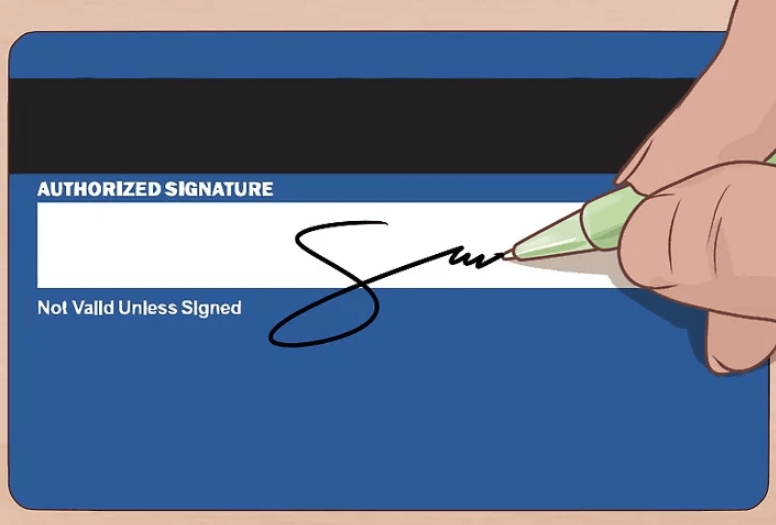
Please, kindly take into consideration that merchants are prohibited to accept a credit/debit card unless it is signed.
To sign the card you need to place the signature manually on the backside of the card. Kindly note that you need to sign the card itself, not a piece of paper attached to it. You may use a pen or marker of any color.
I have not received my card withdrawal yet
We would like to remind you that Visa/Mastercard is a payment system that allows only a refund of the deposited funds.This means that you can withdraw via card only the sum of your deposit.
One of the key reasons that a card refund takes as long as it does is the number of steps involved in the refund process. When you initiate a refund, as when you return merchandise to a store, the seller requests a refund by beginning a new transaction request on the card network. The card company must receive this information, check it against your purchase history, confirm the merchants request, clear the refund with its bank, and transfer the credit to your account. The cards billing department must then issue a statement that shows the refund as a credit, which serves as the final step in the process. Each step is an opportunity for delays due to human or computer error, or due to waiting for a billing cycle to elapse. That is why sometimes refunds take more than 1 month!
Please, kindly be informed that usually withdrawals via card are processed within 3-4 days.
If you didnt receive your funds within this period, you can contact us in chat or via e-mail and request withdrawal confirmation.
Why was my withdrawal amount reduced?
Most likely your withdrawal has been reduced to match the deposit amount.We would like to remind you that Visa/Mastercard is a payment system that allows only a refund of the deposited funds.
This means that withdrawal should be processed proportionally to the deposited sums.
For example:
You deposited via credit/debit card $10, then $20, then $30.
You will need to withdraw back to this card $10 + withdrawal fee, $20 + withdrawal fee, then $30 + withdrawal fee.
You can withdraw the amount exceeding the total amount of deposit made via card (your profit) to any electronic payment system available in your Personal Area.
If your balance has become less than your total card deposit amount during the trading, dont worry - you still will be able to withdraw your funds. In this case, one of your card deposits will be refunded partially.
I see the "Insufficient funds" comment
Kindly note that if you have open trades while making a withdrawal request, and your Equity is less than the withdrawal amount, your request will be automatically rejected with the comment "Insufficient funds".
Payment Systems common questions
How can I deposit via Bitcoin?
You can transfer funds from your Bitcoin wallet to the FBS account in just a few steps. If you dont know how to make a deposit in general, read this article.
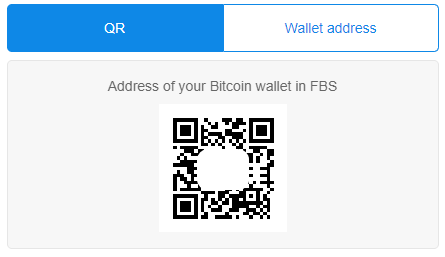
Important information! Each of your trading or investor FBS account have a specific Bitcoin wallet address. Upon choosing the account, you generate this unique address. If you copy the QR code but then decide to change the account and use the previously copied code, your deposit will still be credited to the account chosen before.
Please double-check that the address you are sending to is correct: all the transfers confirmed by the blockchain are not reversible.
Follow these steps to deposit via Bitcoin:
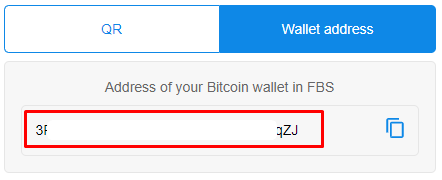
1 Use the QR code to see the Bitcoin wallet of your trading account or simply copy it from the "Wallet Address" folder:
2 To calculate the approximate amount you will receive, please, use the "Calculate the payment" form.
Please, take into consideration that the deposit amount depends on the currency exchange rate at the moment of transaction and, in the end, may be different from what you saw in the "Calculate the payment" form.
3 Go to your Bitcoin wallet to make the payment using the previously copied Bitcoin wallet address of your trading/investor account.
4 Once you have made a successful transaction, an email with a confirmation link will be sent to your mailbox.
5 Open the provided link in the same browser in which your Bitcoin wallet is opened to confirm the outgoing transaction. It will be broadcast now to the blockchain.
After receiving 3 confirmations in the blockchain system, you will be able to see your deposit in the Transaction History.
We recommend you deposit $5 or more because the deposits for less amounts are processed manually and may take longer.
Which Bitcoin wallet address should I use for withdrawal?
We would like to remind you that the Bitcoin wallet addresses dont expire. Once the Bitcoin address is generated, it never vanishes. Thus, the funds should be withdrawn back to the same Bitcoin wallet address you made the first withdrawal to.The Bitcoin address may change; however, you can use only one address to receive funds.
In case you’re not sure about the availability of your Bitcoin wallet, please contact the customer support of the bitcoin payment processor you deposited with.
My withdrawal request via e-wallet has been rejected
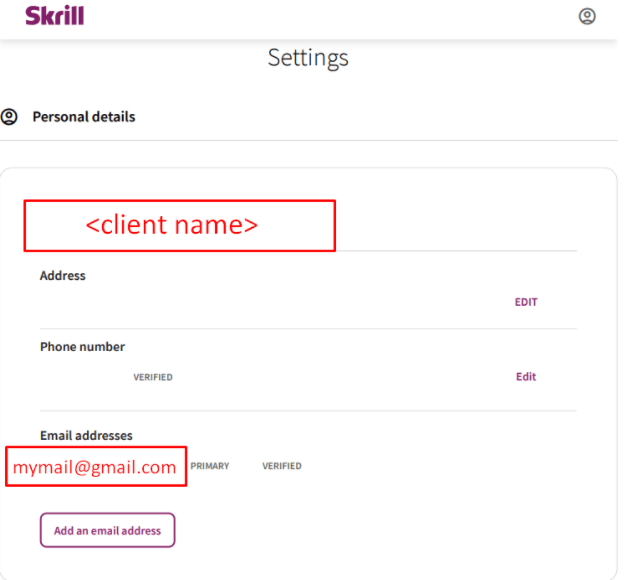
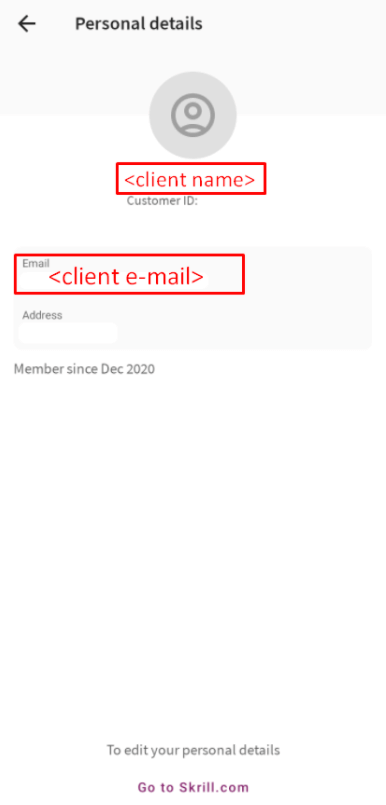
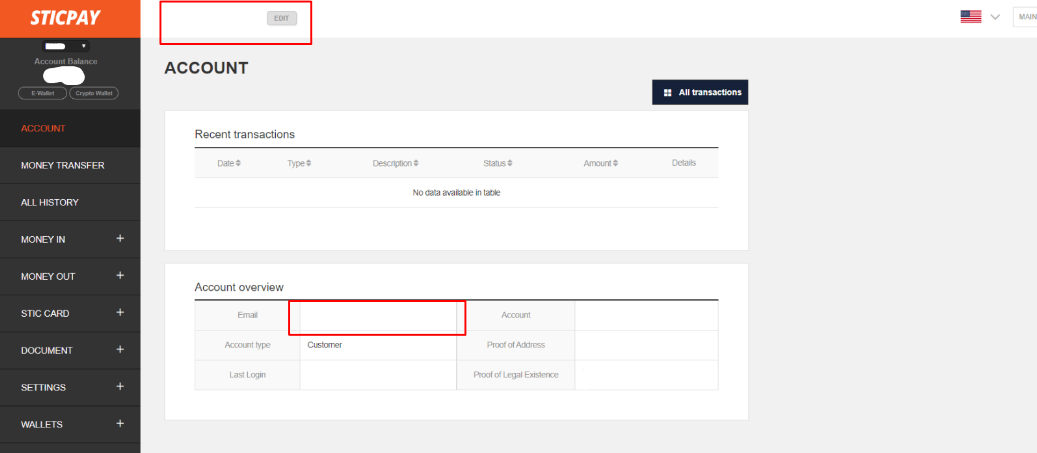
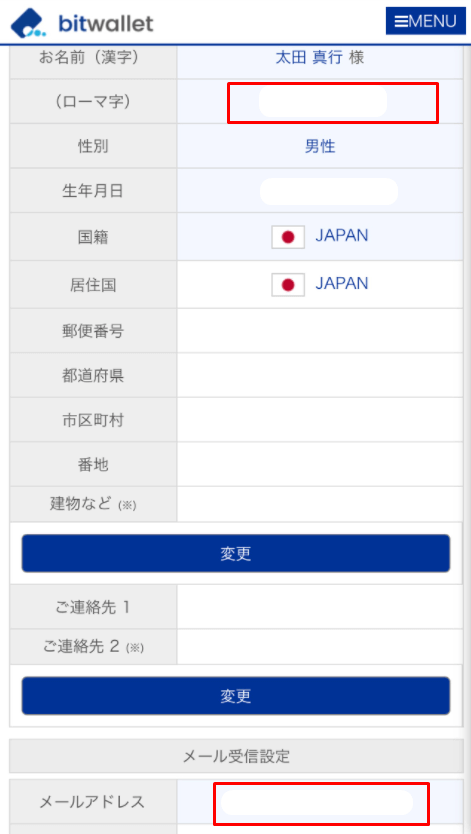
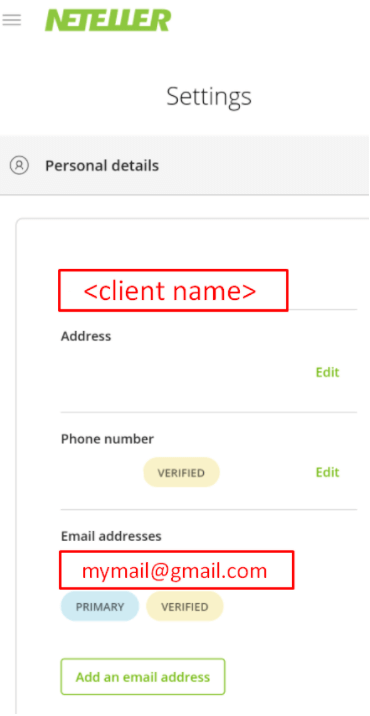
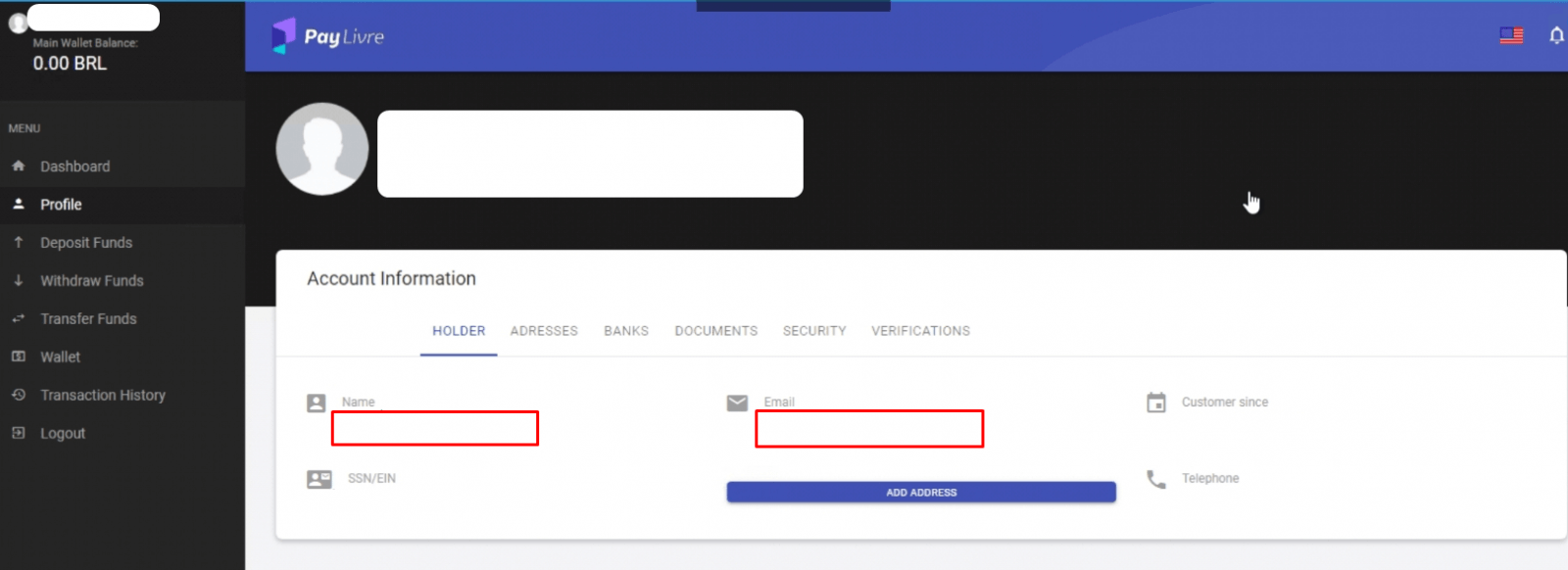
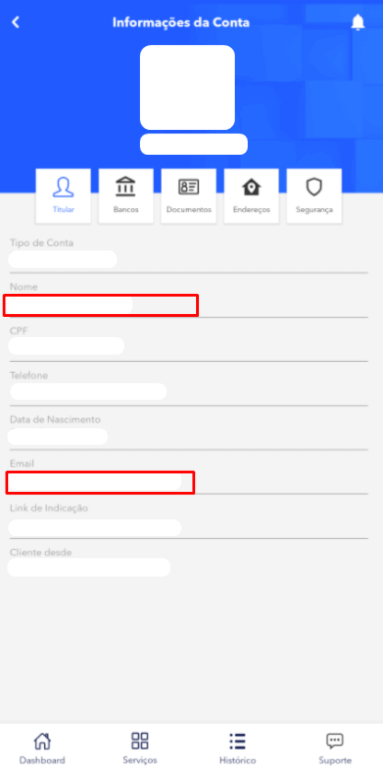
If your withdrawal request via the electronic payment system was declined with the comment "Please confirm that your e-wallet is under your name or contact FBS Customer Support," this means that you need to confirm that your e-wallet is verified and belongs to you.To do that, send us a screenshot from your e-wallet settings page where we can see your name and the e-wallet account e-mail. Below you can find the example of the confirmation for the following e-wallets:
- Skrill
- SticPay
- BitWallet
- Neteller
- Paylivre
Attention! Wallet confirmation is required only on the first withdrawal via a particular e-wallet.
Skrill
Web:
Phone:
SticPay
BitWallet
Web:
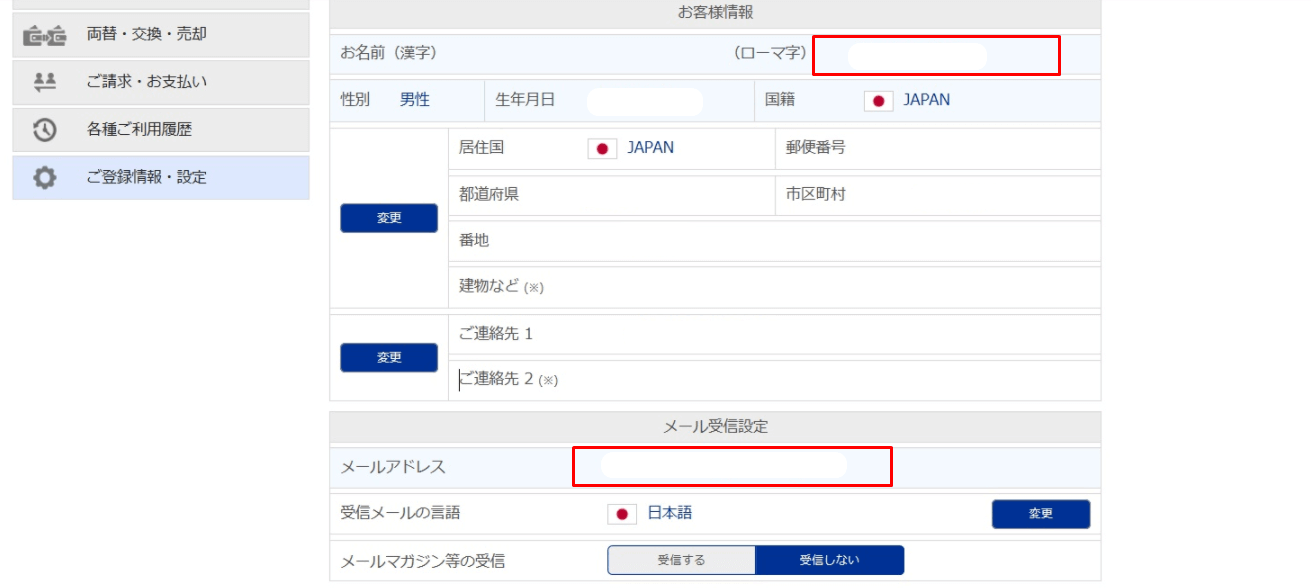
Phone:
Neteller
Web:
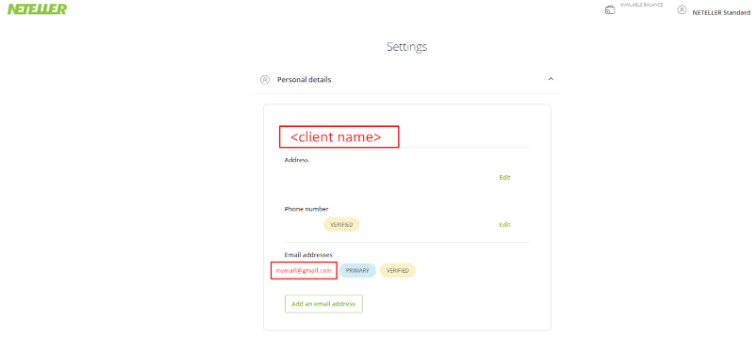
Phone:
Paylivre
Web:
Phone:
My withdrawal request via Perfect Money has been rejected
If you see "E-wallet is not registered under your name" comment in the Transaction History, it means that your "Account name" in your Perfect Money settings differs from the name stated in your Personal Area.In this case, please, kindly go to your Perfect Money account settings:
There, please, change your "Account name". It should be the same way as in your FBS Personal Area.
After that, please, kindly create a new withdrawal request.
Exchangers. How can I use them for deposit and withdrawal?
First of all, we would like to remind you that Exchanger is a service that exchanges your money for electronic currency or one electronic currency for another. In FBS, the trusted partners who can guarantee the safety of withdrawals and deposits act as Exchangers.The main advantage of this payment system over the others is that Exchangers offer various ways to deposit and withdraw funds, including bank wire, mobile money, USSD, Local ATM, and others (depending on the specific Exchanger).
How to deposit using Exchangers?
If the Exchanger payment method is available in your region, you can find it directly in the "Finances" section.
In order to make a deposit, you need to choose the preferred Exchanger in the “Finances” tab and click on it. After that, you will be redirected to the Exchanger website to specify the payment details.
You can find all the necessary information regarding the processing time and the exchange rate for each currency pair in a specific period on the website.
When you use an Exchanger to deposit funds, it acts as an intermediary who transfers funds from its FBS account to your trading account, which you specified beforehand.
How to withdraw using Exchangers?
You can withdraw funds in the "Finances" tab by clicking on the payment system you deposited with. There, its necessary to specify the withdrawal amount and confirm the payment. After your withdrawal request is processed on the FBS side, you should contact the Exchanger and indicate the details of your e-wallet/bank account to which you wish to receive funds.
Please, pay attention! In case the Exchanger that you used to deposit was closed or became inactive in your region, please contact our customer support to get the instruction on how to withdraw your funds.
I deposited via Apple/Google pay. Will I get a refund back to my Device Account Number?
Sure! To do so, you will need to withdraw funds back to the very same bank card you deposited with.What happens when I deposit via Apple/Google Pay?
Basically, when you add cards to Apple/Google Pay, a Device Account Number is created in place of your card account number. This number is used when you make a payment with Apple/Google Pay so that your card account number isnt shared with the merchant and doesn’t appear on the receipt. The same device account number is displayed in our system when you deposit.
Do I need to make a withdrawal back to my Device account number?
No! As it was written above, you need to withdraw funds back to your actual (real) card number. In this case, your withdrawal transaction will go smoothly and be credited as soon as possible.
How can I deposit via the Philippines local bank?
FBS provides a wide variety of convenient local payment systems for clients from the Philippines.All the payment systems available for the Philippines you can find on the "Finances" page in any of the FBS applications or the web version of the Personal Area. If you dont know how to make a deposit in general, read this article.
To deposit via a local bank of the Philippines, please follow the steps below:
1 Choose a convenient local bank in the "Deposit" section.
- Please make sure you have a regular account with the chosen bank (with passbook) because you will need to withdraw funds using the same bank you deposited with;
2 Enter all the required and up-to-date information and confirm the payment by clicking on the “Deposit” button;
3 You will be automatically redirected to the payment system page. Click on the "Pay now" button;
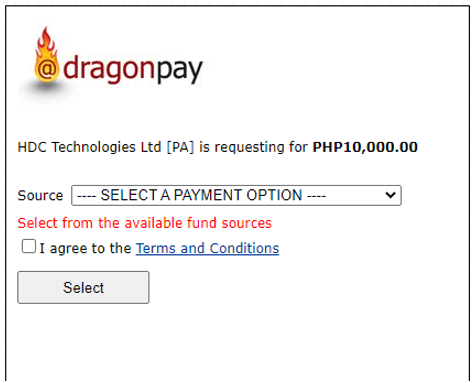
4 You will be routed to the page where you can choose to pay via “Online banking” or “Over-the-counter” as shown in the example below:
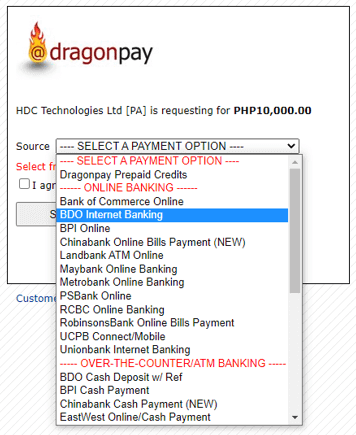
5. After that, you need to enter your e-mail address or phone number to receive the payment instructions:
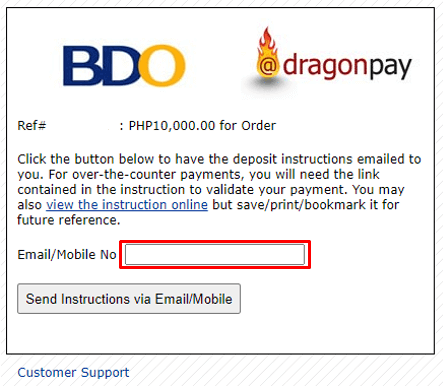
6 You will be redirected to the payment processing page. During this step, it’s necessary to check either your email or smartphone for further payment instructions. If you havent received any emails, make sure that you have enabled notifications via email in the online bank, and try again.
Example of the letter:
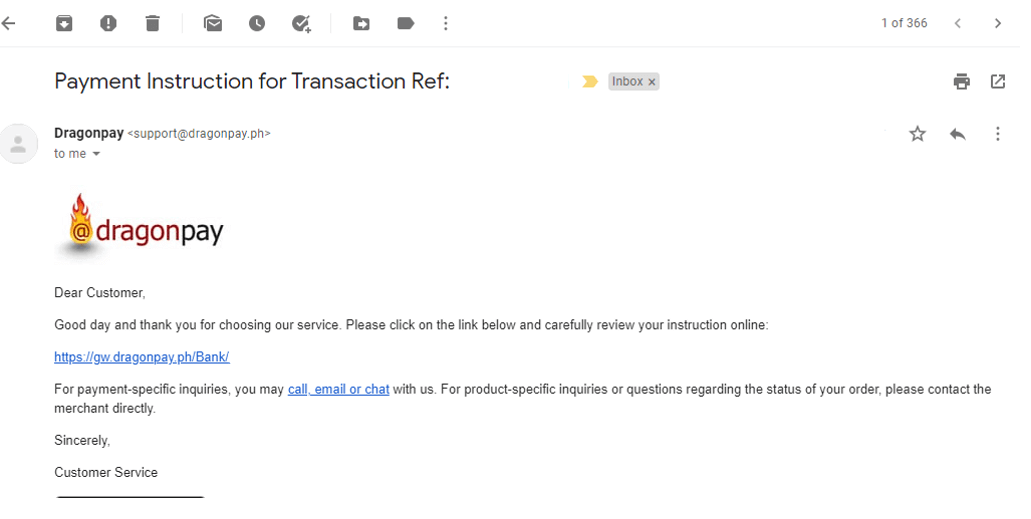
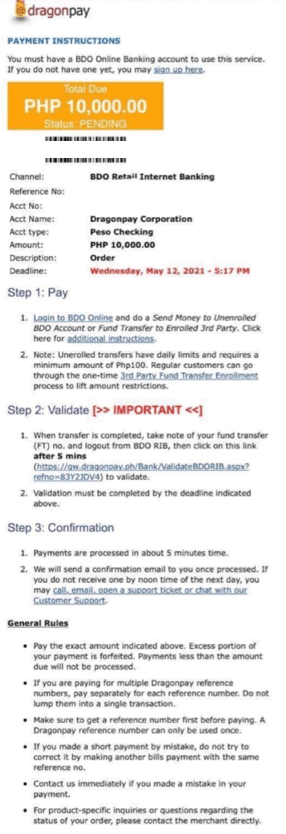
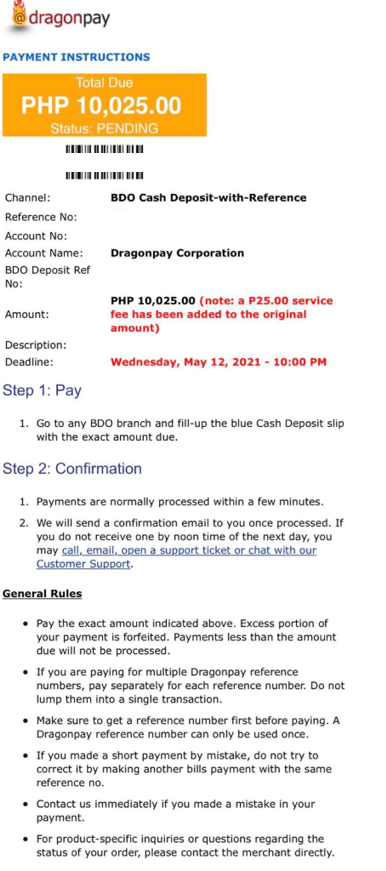
Please, pay attention! Upon receiving the payment instructions, you have 1 hour to make an online bank deposit and 6 hours to make an over-the-counter deposit.
The payment instruction will look like this:
Online Banking and Over-the-counter examples:
 |
 |
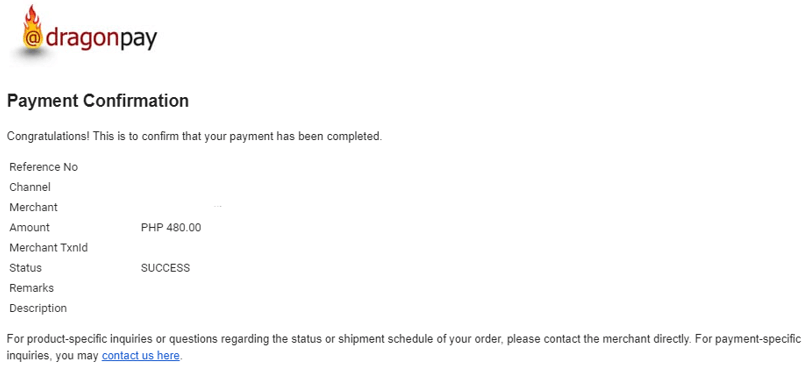
Once the payment is made, you will receive a payment confirmation from Dragon Pay via email (or phone number) for Online Banking:
How can I deposit via local payment systems in Latin America?
FBS provides a wide variety of convenient local payment systems for clients from Latin America.What do you need to know to make a successful deposit?
- You can deposit in the "Finances" tab in any FBS applications or web Personal Area.
- You should correctly fill in all the necessary information on the selected payment system page. The filled-in information must be relevant.
- In the "Document Number" field, you should enter the number of the same document you used for bank account registration.
- For example, clients from Brazil should enter their Brazil National CPF in the “Document Number” field.
- Once you have confirmed the filled information and clicked on the "Deposit" button, you will be able to perform the deposit online or offline. We recommend you carefully read and follow the specified instructions on the payment page.
- Offline deposit. Upon filling in the information on the FBS page, you will be forwarded to the payment system page, where you can get the invoice. With it, you can make a deposit directly at the bank or ATM;
- Online deposit. Upon filling in the information on the FBS page, you will need to confirm it on the payment system page to perform payment using online banking. You will need to specify the provided identifier number and payment number for this.